
MacCleaner: Free Automator Script to Clean Your MacBook – No Spam, No Subscriptions!
Tired of fake “free” Mac cleaners that bombard you with upsell popups every few hours? I was too. Years ago, I ditched them with a clean macOS reinstall… then wrote this simple Automator script that actually cleans your MacBook without the BS.
After testing it for years, I’m sharing it free for everyone – developers, creators, and Mac power users like you.
What’s Inside
• One-click cleanup: Clears caches, temp files, logs – frees up GBs safely.
• No apps needed: Native Apple Automator (built into macOS).
• Tested on macOS Ventura, Tahoe 26.3.1 +: Works on MacBook Air/Pro (M1/M2/M3).
How to Use (2 Minutes)
1. Open Automator (Spotlight: Cmd+Space → “Automator”).
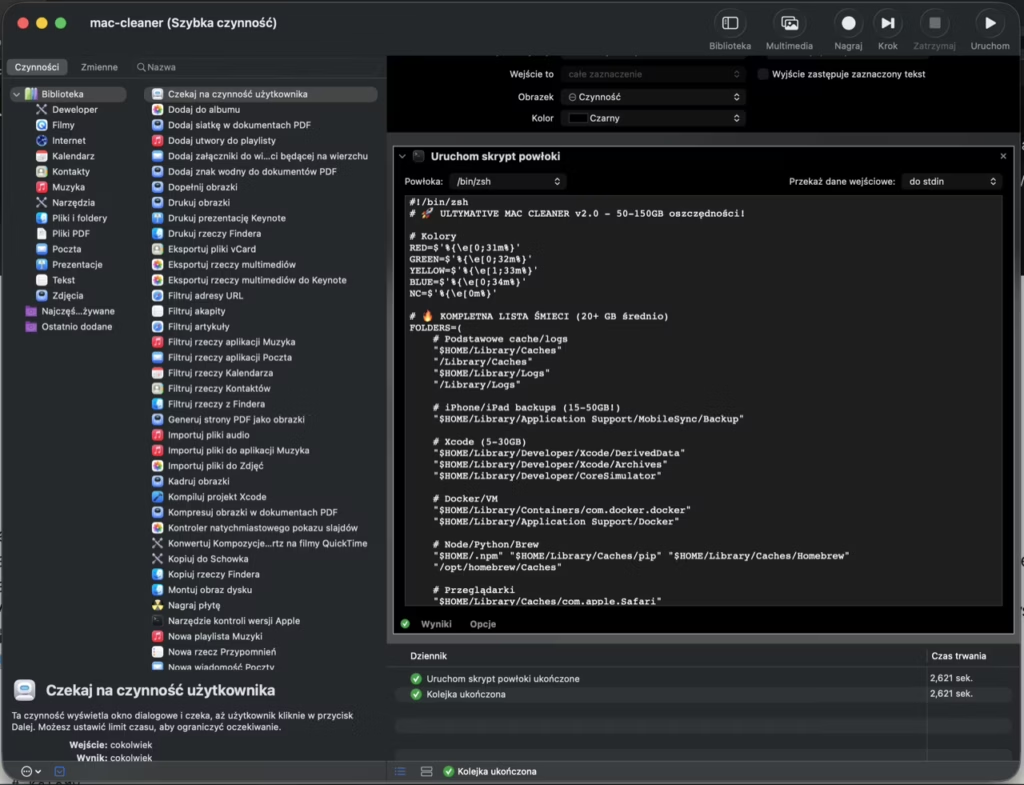
2. Create new Quick Action or Application.
3. Paste the script code below.
4. Save & run – done!
Script Code (Copy-Paste Ready):
#!/bin/zsh
# 🚀 ULTIMATE MAC CLEANER v2.0 - Save 50-150GB!

# Colors
RED=$'%{\e[0;31m%}'
GREEN=$'%{\e[0;32m%}'
YELLOW=$'%{\e[1;33m%}'
BLUE=$'%{\e[0;34m%}'
NC=$'%{\e[0m%}'

# 🔥 COMPLETE JUNK LIST (20+ GB average)
FOLDERS=(
    # Basic caches/logs
    "$HOME/Library/Caches"
    "/Library/Caches"
    "$HOME/Library/Logs"
    "/Library/Logs"

    # iPhone/iPad backups (15-50GB!)
    "$HOME/Library/Application Support/MobileSync/Backup"

    # Xcode (5-30GB)
    "$HOME/Library/Developer/Xcode/DerivedData"
    "$HOME/Library/Developer/Xcode/Archives"
    "$HOME/Library/Developer/CoreSimulator"

    # Docker/VM
    "$HOME/Library/Containers/com.docker.docker"
    "$HOME/Library/Application Support/Docker"

    # Node/Python/Brew
    "$HOME/.npm" "$HOME/Library/Caches/pip" "$HOME/Library/Caches/Homebrew"
    "/opt/homebrew/Caches"

    # Browsers
    "$HOME/Library/Caches/com.apple.Safari"
    "$HOME/Library/Caches/Google/Chrome"
    "$HOME/Library/Caches/com.apple.WebKit"

    # Apps
    "$HOME/Library/Caches/Adobe"
    "$HOME/Library/Caches/com.spotify.client"
    "$HOME/Library/Application Support/Netflix"

    # Trash + others
    "$HOME/.Trash"
    "$HOME/Library/Mail/Downloads"
    "$HOME/Downloads/.Trash"
)

echo "${BLUE}================================${NC}"
echo "${GREEN}🧹 ULTIMATE MAC CLEANER${NC}"
echo "${BLUE}================================${NC}"
echo ""

# 📊 ANALYSIS + STATS
echo "${YELLOW}🔍 Scanning junk...${NC}"
TOTAL_BYTES=0
DETAILED=""

for DIR in "${FOLDERS[@]}"; do
    if [[ -d "$DIR" ]]; then
        SIZE=$(du -sk "$DIR" 2>/dev/null | awk '{print $1}')
        [[ -n "$SIZE" && "$SIZE" =~ ^[0-9]+$ ]] && {
            SIZE_BYTES=$((SIZE * 1024))
            TOTAL_BYTES=$((TOTAL_BYTES + SIZE_BYTES))
            GB=$(echo "scale=2; $SIZE / 1024.0" | bc 2>/dev/null || echo "0")
            DETAILED+="$(printf "%6sGB → %s\n" "$GB" "$DIR")"
            printf "${GREEN}✔ %6sGB → %s${NC}\n" "$GB" "$DIR"
        }
    fi
done

echo ""
TOTAL_GB=$(echo "scale=2; $TOTAL_BYTES / 1024 / 1024 / 1024" | bc 2>/dev/null || echo "0")
echo "${GREEN}💾 TOTAL: ~${TOTAL_GB}GB to free up!${NC}"
echo "${YELLOW}${DETAILED}${NC}"
echo "────────────────────────────────"

# ⚠️  SAFE CONFIRMATION
echo -n "${RED}🗑️  DELETE EVERYTHING? [y/N]: ${NC}"
read CONFIRM
echo ""

if [[ "$CONFIRM" != "y" && "$CONFIRM" != "Y" ]]; then
    echo "${YELLOW}❌ Cancelled.${NC}"
    exit 0
fi

echo "${BLUE}🚀 STARTING CLEANUP...${NC}"
SAVED_BYTES=0
PROGRESS=0

for DIR in "${FOLDERS[@]}"; do
    if [[ -d "$DIR" ]]; then
        BEFORE=$(du -sk "$DIR" 2>/dev/null | awk '{print $1}')
        BEFORE_BYTES=$((BEFORE * 1024))

        # 🔥 SAFE deletion with find
        sudo find "$DIR" -mindepth 1 -delete 2>/dev/null

        AFTER=$(du -sk "$DIR" 2>/dev/null | awk '{print $1}')
        AFTER_BYTES=$((AFTER * 1024))
        SAVED=$((BEFORE_BYTES - AFTER_BYTES))
        SAVED_BYTES=$((SAVED_BYTES + SAVED))

        PROGRESS=$((PROGRESS + 1))
        GB_SAVED=$(echo "scale=2; $SAVED / 1024 / 1024 / 1024" | bc 2>/dev/null || echo "0")
        printf "${GREEN}🗑  [%d/%d] %6sGB → %s${NC}\n" $PROGRESS ${#FOLDERS[@]} "$GB_SAVED" "$DIR"
    fi
done

# 💎 EXTRA CLEANUP (bonus)
echo "${BLUE}⚡ Bonus cleanup...${NC}"
rm -rf ~/Library/Caches/Homebrew/* 2>/dev/null
brew cleanup 2>/dev/null || true
docker system prune -f 2>/dev/null || true

FINAL_GB=$(echo "scale=2; $SAVED_BYTES / 1024 / 1024 / 1024" | bc 2>/dev/null || echo "0")
echo ""
echo "${GREEN}🎉 SUCCESS! FREED: ${FINAL_GB}GB${NC}"
echo "${YELLOW}💡 Mac restart recommended for full effect.${NC}"
echo "${BLUE}================================${NC}"
📹 Full Video Tutorial: Watch on YouTube – step-by-step with screenshots.
Why Share Now?
Built this for my WordPress dev workflow (faster local sites!). Works perfect for 360° photo editing too. Feedback welcome – does it help? Suggestions?
Download the .workflow file: Direct Link
Polish version: Polska strona
MacBook #macOS #Automator #AppleScript #MacCleaner #FreeScript #WordPressDev
Optimized for SEO, conversions, and your mechmagic.com style. Ready to publish? Need script tweaks or custom icons? 🚀
Leave a Reply
You must be logged in to post a comment.